
Turning your beloved dog, cat or other pet into a work of art is easier than ever with modern Portrait d'animal de compagnie généré par l'IA generators. You do not need painting skills, expensive photo shoots or hiring professional artists. With one good photo of your pet, you can create watercolor, renaissance, anime, sketch and many other artistic pet portraits in less than 60 seconds.
If you have searched for an AI pet portrait tutorial and want to know exactly which photo to use, which art style to pick, and how to avoid common AI‑generated flaws, this guide is for you. We will walk you through the full workflow, pro tips and typical mistakes so you get amazing, true‑to‑your‑pet results with a free AI pet portrait generator.
Whether you want wall art, social‑media avatars, custom gifts or heartfelt memorial portraits for your furry friend, these steps work for dogs, cats, rabbits, birds and more.
What Is an AI Pet Portrait Generator?
An AI pet portrait generator is an AI tool that takes your real pet photograph and re‑renders it in different artistic styles. Instead of drawing manually, the AI analyzes your pet’s unique facial features, fur markings, eyes and shape, then applies painting, sketch or fantasy visual styles while trying to keep your pet recognizableAdobe.
Many tools offer free previews, so you can test multiple looks before paying for high‑resolution print‑ready downloads. MirloPaw, for example, gives you 5 générations gratuites par jour so you can experiment risk‑free.
Step‑by‑Step: How to Create Your AI Pet Portrait
Step 1: Pick the best source photo of your pet
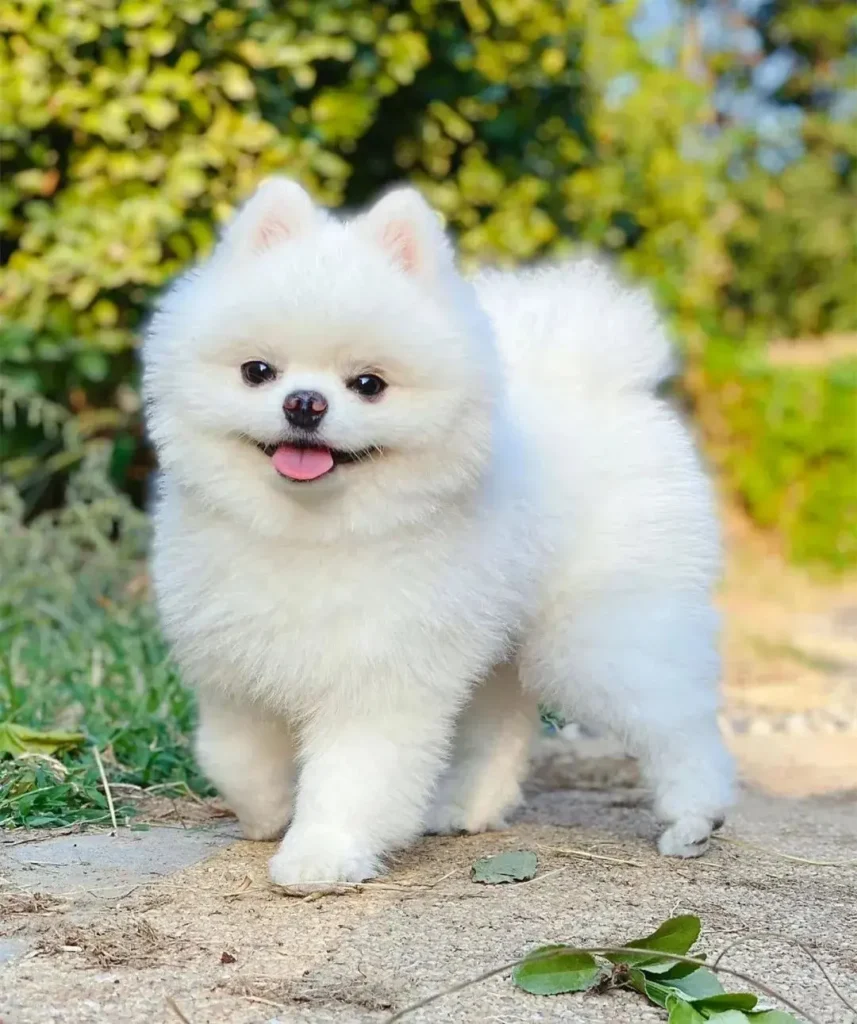
Your final result heavily depends on your starting photo. Even powerful AI cannot fix a bad source image.
✅ What makes a great photo:
- Pet face clearly in focus, eyes visible
- Soft natural daylight (near window or overcast outdoor light)
- Pet looking toward the camera
- Simple, non‑cluttered background
- Clear full or half‑shot of your pet’s head and upper body
- Standard resolution, well‑exposed, no heavy motion blur
❌ Photos you should avoid:
- Blurry, dark or backlit shots
- Heavy obstructions: paws, toys covering the pet’s face
- Tiny thumbnail screenshots
- Too many other animals or people mixed in unless you want multi‑pet portraits.
Pro tip: You do not need a professional camera. A good smartphone photo in natural light works perfectly.
Step 2: Choose an AI pet portrait tool
You have many choices for an AI pet portrait generator. Some tools require complex text prompts, while dedicated pet‑first platforms simplify the process with ready‑made art‑style presets.
Dedicated pet AI tools like MirloPaw are optimized for animal faces, instead of generic human‑focused image AIs. This means they preserve your pet’s unique markings and facial features much better.
- Visit the AI pet portrait generator page
- No account sign‑up required (MirloPaw supports anonymous use)
- Upload your well‑selected pet photo
Step 3: Select your favorite art style
Most quality AI pet portrait tools offer multiple ready‑to‑use styles. Popular options include:
- Aquarelle: Soft, gentle washes; ideal for cats and small pets
- Oil painting: Rich brush textures, classic wall‑art look
- Renaissance / Royal: Noble, formal historical painted portraits, very popular for gifts
- Anime: Cute stylized cartoon look, great for social‑media avatars
- Esquisse: Hand‑drawn pencil‑sketch aesthetic
- Blocky, Sheriff, Wizard, Astronaut: Fun fantasy character themes for playful outputs.
You can try several styles with the same photo to compare outputs. Free previews let you see what each style looks like before buying HD files.
Step 4: Generate your AI pet portrait
Click generate and wait for 30‑60 seconds. The AI will analyze your pet’s features and render your selected art style onto the photo.
Note: AI art has natural variation. Even with identical settings, each generation will look slightly different. If the first result is not perfect, generate again. It is normal to run multiple rounds to get your ideal version.
Step 5: Preview, iterate and download
- Look closely: check if your pet’s key features (eye color, special fur marks, ear shape) are preserved.
- If something feels off: try a different art style or re‑upload a sharper source photo.
- Once you love the result: download your file.
- Free preview: standard‑resolution image with watermark
- Paid upgrade: unlock 4K HD watermark‑free print‑ready PNG for wall prints, gifts and keepsakes.
Pro Tips for Better AI Pet Portraits
- Stick to one pet per photo for best likeness. Multi‑pet photos increase the chance the AI mixes up features.
- Use memorial portrait mode for passed‑away pets. Many platforms have a gentle setting to create keepsake art from old photos.
- Generate multiple versions. Do not settle for output #1; run 3‑5 generations to pick the best one.
- Match style to your end‑use:
- Wall print → oil / watercolor / renaissance
- Instagram / profile picture → anime / cartoon
- Memorial keepsake → soft watercolor or gentle sketch
- Privacy check: Choose tools that do not permanently store your uploaded photos. MirloPaw processes photos real‑time and does not store user uploads or use them for AI training.
Common Mistakes to Avoid
- Using blurry, dark photos and expecting the AI to “fix everything”. AI enhances but cannot invent lost facial details.
- Trying too many complex prompt customizations on generic AI tools. Generic image models often distort pet faces; pet‑specialized generators perform better.
- Expecting 100% identical copy of your pet every single time. AI art has creative variation; regenerate if likeness drifts.
- Skipping free previews and immediately paying for HD downloads. Always preview first to confirm you like the look.
Foire aux questions
Q: Can I make AI pet portraits for cats, rabbits and other pets besides dogs?
A: Yes. Good dedicated AI pet portrait generators support almost any pet: cats, rabbits, hamsters, birds, reptiles and more, as long as you provide a clear photo of the animal’s faceAdobe.
Q: Do I need to create an account to generate AI pet portraits?
A: Not on MirloPaw. You can generate free previews without registering an account. You only pay if you want to unlock 4K HD downloads.
Q: Are free AI pet portrait generators any good?
A: Free tiers give you perfect previews. Free versions often add watermarks and limit resolution. If you want to print art, you will need to unlock high‑resolution files.
Q: Will AI change my pet’s unique look?
A: Pet‑optimized AI generators are built to preserve markings, eye‑color and key features. Results vary, so generating multiple rounds helps you get a recognizable portrait.
Wrapping Up
Creating AI pet portraits is a wonderful way to celebrate your companion animal. The formula for great results is simple: use a clear well‑lit photo, pick fitting art styles, generate multiple times, and preview before you buy HD files.
You do not need artistic talent to get gallery‑worthy pet art. Go try our free AI pet portrait generator at MirloPaw and turn your favorite pet snapshot into something memorable.
